RAD Virtual Psionics Engine
Overlay · Modulation · Projection — for Virtual RAD systems, Chi Generators & intentional work
‘USE IT ONLY FOR POSITIVE GOALS & TRENDS’
In a nutshell:
It increases the success ratio of any Virtual Psionics application by 25% (guarantee) and more, depending on from combination of files and settings it can exceed even up to 300-500% (for example in deep, auto-hypnosis audio session [not included]), especially due to random and dynamic changes (see Global Pulse Modulation), where files (trends, trend cards, pentacles, affirmation images, etc.) manifests dynamically, regulated by an audio player and isochoric generator.
It’s one major successful manifestation key to change the way you induce an energy stream toward your final goal.
This can also be used to listen via headphones or speakers to additionally impact your mind/body/reality. You know how suggestive simple spoken affirmations are (or high-quality TTS) when you’re in the right mood for them.
All digital files can be used in conjunction. Even your favorite music can bring results — this also allows making the manifestation process without boredom and following it in a more attractive and fun way.
It’s like use the same set of energies with modulated and unexpected modulation ways – to maximalize chances to achieve desired goal/s. Not constant, just dynamic; personalized.
🔄 UPDATE — RAD Virtual Psionics Engine
New version is live! Here’s what’s new:
1. Main Generator with Sound The Main Generator now plays audio for MP4 files — and the sound stays perfectly in sync with all other audio layers in your session. Global volume and the volume of each individual sound source can be adjusted freely. Mix your soundtrack exactly the way you want it.
2. Full & Light versions (as before) Two editions remain available: the Full version (all features, richer sessions) and the Light version, optimized for older / less powerful phones.
3. NEW — Windows Installers Both versions now come with dedicated Windows installers, so you can run your projection sessions directly on your PC:
- RAD-Virtual-Psionics-Engine-Full-Setup-Windows
- RAD Virtual Psionics Engine Light-Setup-Windows
Supported systems: Windows 10 and Windows 11 (64-bit). Older Windows versions (7/8/8.1) are not officially supported. Simply download, run the installer, and manifest from your desktop.
As always: USE IT ONLY FOR POSITIVE GOALS & TRENDS.
What it is
RAD Virtual Psionics Engine is a professional overlay, modulation and projection environment designed first and foremost to work with SMF Virtual Psionics systems — including Virtual RADX, Virtual Psionics 3000VX, Virtual God Caster, VGC Ultra, and VGC Odin.
It also pairs naturally with VRA Love Devices, Physical Chi Generators, and Paper Chi Generators, allowing virtual and physical tools to be combined into one visual and audio session.
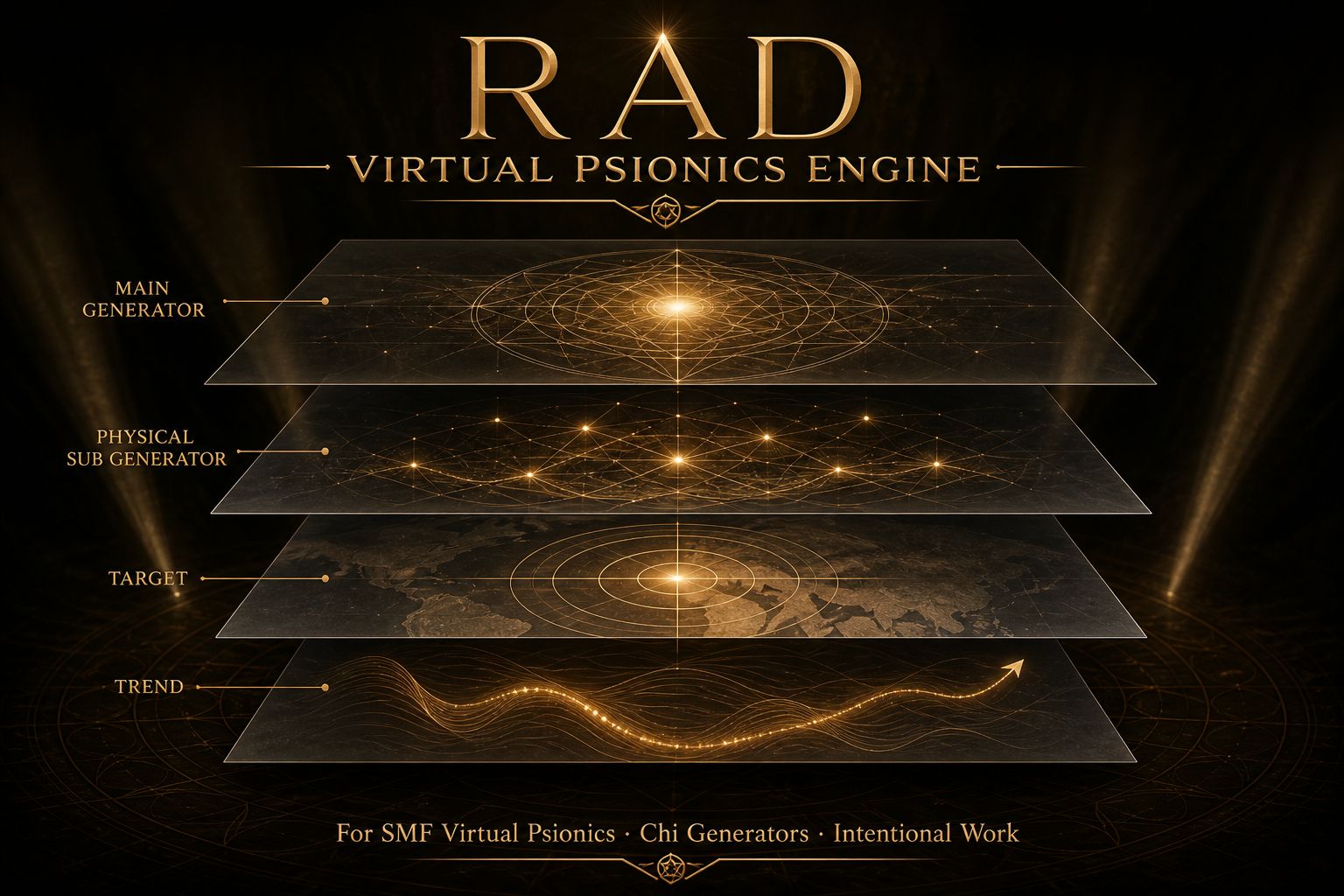
Load one generator at a time into Main Generator (JPG / PNG / GIF / MP4). Optionally place physical tools into Physical Sub Generator(s) — crystal photos, passive generators, tensor rings, and other physical devices. Transparent PNG files work especially well when you want an element to appear as a floating overlay.
Then load Target(s) and Trend(s) images representing the target and intended direction of the session.
On the settings stage, layers can be positioned directly with your finger. Physical Sub Generator(s), Target(s), and Trend(s) each have dedicated controls for size and opacity:
- Red control — resize
- Blue control — opacity
At the top of the interface you will find Zoom In / Zoom Out and seven chakra color themes, allowing the visual environment to match the selected intent or overall trend.
When everything is configured, switch to Full screen for the projection stage.
Who it’s for
Designed for practitioners who combine virtual RAD / psionics engines, love / relationship devices, physical chi tools, and paper generators into a single session.
The engine brings together visual layers, sound, pulse and modulation, sacred geometry, unique file number rates, and affirmations in one synchronized environment.
Core Stage — Layers That Mean Something
Main Generator
The primary field of the session.
It can contain an SMF Virtual Psionics system such as:
- Virtual RADX
- Virtual Psionics 3000VX
- Virtual God Caster
- VGC Ultra
- VGC Odin
- VRA Love Devices
- Physical Chi Generators
- Paper Chi Generators
Main Generator supports natural proportions, flipping and 90° rotation.
Its unique file number rate acts as the master rate for sacred geometry and affirmations.
Physical Sub Generator(s)
Optional physical layer positioned beneath the Main Generator in the Files structure.
Use it for:
- crystal images
- tensor rings
- passive generators
- photographs of physical hardware
- other physical tools
The same positioning, sizing and opacity controls are available as for Target(s) and Trend(s).
Transparent PNG files are recommended when creating floating overlays.
Target(s)
Images representing the target of the session — for example a person, place, situation or symbol.
Multiple targets can be loaded:
Target(s)1, Target(s)2, Target(s)3…
Trend(s)
Outcome, direction and intention cards or symbols.
Multiple trends can be loaded:
Trend(s)1, Trend(s)2, Trend(s)3…
Together, Target(s) and Trend(s) define the intentional direction of the session.
Unique File Number Rates
Each loaded layer can have its own unique file number rate.
Rates can be generated individually or calculated for all loaded files at once.
During Full screen projection, rates appear in a dedicated row for:
- Main Generator
- Physical Sub Generator(s)
- Target(s)
- Trend(s)
The displayed rates use chakra / color-therapy coloring and can also serve as the numerical basis for sacred geometry and affirmation movement.
The Main Generator rate is the primary/master rate, while Physical Sub Generator(s), Target(s), and Trend(s) provide secondary rates.
Sound Mode
The engine provides four ways to combine sound and modulation:
- Isochronic only
- Simultaneous — Isochronic + music with adjustable audibility balance
- Audio only
- Iso → modulates Audio — Isochronic frequency shapes the music while the isochronic signal itself can remain silent
This allows the same audio system to function either as an audible component of the session or as an underlying modulation source.
Isochronic Player
The built-in Isochronic Player provides a frequency environment ranging from ultra-slow bands through gamma.
Features include:
- frequency control
- volume control
- carrier tone
- named presets
- timed sequences
- looping
- Solfeggio / base carrier libraries
- Planetary carrier libraries
- Chakra carrier libraries
Isochronic audio can be used as the audible pulse of the session or as a silent modulation source for music and visual elements.
Audio Player & Playlist During Projection
The built-in Audio Player allows you to listen to your favorite local playlist while the session is projecting.
Load local tracks and control them directly inside the engine:
- Play / Pause
- Previous / Next
- Volume
- Progress
- Loop current track
- Loop entire playlist
Your music continues alongside the visual projection without requiring a separate audio application.
In Sound Mode, you can choose between music and isochronic audio in several ways:
Isochronic + Music
Play both simultaneously and balance their relative audibility.
Audio Only
Use your playlist without an audible isochronic layer.
Iso → modulates Audio
Allow the Isochronic Player to shape the playlist in real time while the isochronic signal itself remains silent.
In this mode, the soundtrack becomes part of the projection environment rather than a separate application running alongside it.
Global Pulse / Modulation
The visual field can respond dynamically to audio and isochronic sources.
Two primary pulse groups are available:
- Main Generator + Physical Sub Generator(s)
- Target(s) + Trend(s)
A balance slider determines how the two groups interact.
Available source signals include:
- amplitude
- RMS
- bass / treble
- envelope
- beat
- kick
- FFT
- BPM
- isochronic frequency
Visual parameters can be modulated without stopping the players, including:
- opacity
- brightness
- scale
- blur
- contrast
- saturation
- rotation
- position
Modulation can be shaped using waveform, curve, ratio, phase and mathematical blending.
Additional options include Safe Mode, Battery Saver, and φ interference.
Music can therefore drive the global pulse, allowing the visual field to respond dynamically to the characteristics of the selected soundtrack.
Sacred Geometry Projector
The Sacred Geometry Projector generates thin-line geometric patterns from combinations of unique file number rates.
The Main Generator’s master rate binds patterns from the Physical, Target and Trend layers.
Choose between:
- automatic pattern generation from the master rate
- manual pattern selection
Supported classical forms include:
- Flower of Life
- Metatron’s Cube
- Merkaba
- yantras
- Platonic solids
- Celtic geometric forms
- other classical geometric patterns
Geometry controls include:
- position
- size
- opacity
- rotation
- pulse strength
- chakra / color-therapy line colors
Geometry can also be synchronized with the Global Pulse / Modulation system.
Affirmations
Affirmations can be integrated directly into the same visual field as the sacred geometry.
One line = one affirmation.
Text follows the same rate-based structure:
- Main Generator — primary/master rate
- Physical Sub Generator(s) — secondary rates
- Target(s) — secondary rates
- Trend(s) — secondary rates
Affirmations can be displayed in Full screen and Start Preview.
Adjustable parameters include:
- color
- scale
- opacity
- rotation
- modulation strength
- base speed
- font size
Speed and layout can follow the unique file number rates and the generated geometry paths.
File Settings
Every loaded file has its own controls for:
- position
- size
- rotation
- opacity
- pulse on/off
- pulse strength
- unique file number rate
- rate digits
- rate color
- rate regeneration
During the settings stage, simply drag the layers directly on the screen.
Visual controls are designed for touch operation:
Red corner = resize
Blue square in the top-right = opacity
These controls are visible in Settings and hidden during Full screen projection.
The Files structure follows the session hierarchy:
Main Generator → Physical Sub Generator(s) → Target(s) → Trend(s)
Session Control
Start / Stop
Starts or stops the complete engine.
Pause
Freezes the session without wiping the current configuration.
Start / Stop Preview
Allows the pulse and visual behavior to be previewed directly from the settings environment.
Calculate All Unique File Rates
Calculates rates for every loaded layer.
Full Screen
Switches to the proportional projection stage with live rates and the complete visual field.
Full Reset
Completely clears the current session, including cached media, settings, choices and loaded files.
Quick Navigation
The application includes Quick Navigation for moving instantly between its major sections.
One-tap navigation provides direct access to:
- Top
- Stage
- Sound
- Isochronic
- Audio Player
- Global Pulse / Modulation
- Sacred Geometry
- Affirmations
- Files
This keeps long configuration screens manageable on both phones and tablets, eliminating the need to repeatedly scroll through long settings pages.
Settings Stay in Memory
Your session configuration is kept in the device’s local cache / local device storage when you close or leave the application.
This can include:
- Main Generator
- Physical Sub Generator(s)
- Target(s)
- Trend(s)
- audio selections
- playlist configuration
- sound mode
- isochronic settings
- pulse settings
- geometry
- affirmations
- zoom level
- chakra theme
Simply leaving or closing the application does not automatically wipe the session.
When you return, you can continue from the previous configuration, refine the layers, change the soundtrack, adjust the modulation, or continue working with the same trend.
Only Full Reset performs a complete cleanup, clearing the cached session data, media and choices so you can begin a completely new session.
How to Use It
A typical session can be built in the following sequence:
- Choose a chakra theme matching the intended direction.
- Load one generator into Main Generator.
- Optionally add Physical Sub Generator(s).
- Load Target(s).
- Load Trend(s).
- Position and resize each layer.
- Adjust layer opacity.
- Generate the unique file number rates.
- Configure Isochronic and/or Audio Player.
- Load your favorite playlist if desired.
- Choose the preferred Sound Mode.
- Configure Global Pulse / Modulation.
- Enable Sacred Geometry if desired.
- Add Affirmations if desired.
- Use Start Preview to check the visual behavior.
- Press Start.
- Switch to Full screen for the projection stage.
- Keep the session running while listening to your playlist.
You can leave the application and return later without losing the current configuration, provided you do not use Full Reset.
Background & Projection
The engine can continue running when you leave the application or turn the screen off, making it suitable for longer sessions.
For the most complete visual projection experience, keep the session open on Full screen so the generator field, trend cards, symbols, sacred geometry, rates and other visual elements remain actively displayed.
You can also lock the phone or leave the display on depending on how you want to run the session.
One Coherent Projection Environment
RAD Virtual Psionics Engine turns your Android phone or tablet into a living overlay and projection desk for SMF Virtual Psionics, VRA Love Devices, Physical Chi Generators and Paper Chi Generators.
Stack a Main Generator, optional Physical Sub Generator(s), Target(s) and Trend(s) into one synchronized visual field.
Then combine them with Isochronic audio, local music playlists, music-driven modulation, sacred geometry, unique file number rates and affirmations.
Run the complete environment in Full screen, keep your favorite playlist playing during projection, use silent Isochronic modulation to shape the soundtrack, or let the system continue working in the background.
Your session stays cached until you deliberately choose Full Reset — while Quick Navigation keeps every major module within one tap.
One engine. One visual field. One synchronized projection environment.
Energy Security & Personal License
RAD Virtual Psionics Engine is designed as a personally secured energetic tool. Each purchased copy is intended exclusively for the person who purchased and licensed it. The application is not intended to be shared, transferred, copied, or used as a personal energetic tool by another individual.
One purchase = one personal user.
Important Disclaimer & Responsible Use
RAD Virtual Psionics Engine is intended for personal experimentation, exploration, visualization, entertainment, and intentional work only.
The application is not intended to diagnose, treat, cure, prevent, or heal any medical condition, and it should not be used as a replacement for professional medical care, psychological care, medication, or any other form of qualified treatment.
Any concepts relating to energy, radionics, psionics, subtle energies, manifestation, projection, frequencies, chakras, or similar practices are presented as part of the application’s experimental and metaphysical framework. Users should make their own informed decisions about how they use the application.
Isochronic Oscillator Safety
Use the Isochronic Player and oscillator functions responsibly and at a comfortable listening level.
Do not use isochronic audio while:
- driving or operating a vehicle
- operating machinery or power tools
- performing activities requiring full attention or situational awareness
- undertaking any activity where reduced attention could create a safety risk
Avoid excessive volume and stop using the audio if you experience discomfort, dizziness, headache, nausea, disorientation, or any other unusual reaction.
The application is not intended for people with photosensitivity or photosensitive seizure disorders, as the visual field may contain pulsing, flashing, rapidly changing, or dynamically modulated imagery. If you are sensitive to flashing or rapidly changing visual stimuli, do not use the projection features.
Use particular caution with long sessions, strong visual modulation, and high-intensity audio.
Using Physical Devices & Generators
Although RAD Virtual Psionics Engine is designed primarily to work with Virtual Psionics systems, it can also be used alongside physical devices, generators, passive tools, and other physical objects.
When using the application with equipment other than Virtual Psionics systems, it is recommended that the Main Generator has a corresponding physical form or physical source whenever possible.
For example, the Main Generator may represent a physical generator, device, object, crystal configuration, or other physical tool being used as the primary source of the session.
You can then add Physical Sub Generator(s) as additional layers. These may represent photographs or visual representations of physical generators, crystals, tensor rings, passive devices, hardware, or other physical tools intended to complement the Main Generator.
In this configuration, the Physical Sub Generator(s) are intended to function as additional energetic source elements within the user’s chosen experimental framework.
Transparent PNG images are especially useful for Physical Sub Generators because they can be positioned as overlays above or around the Main Generator field.
Targets & Trends
Target(s) and Trend(s) do not have to follow a single visual format.
A Trend can be represented by virtually any image or symbolic element that the user chooses as part of the intended direction of a session, including:
- pentacles
- sacred symbols
- sigils
- geometric symbols
- spiritual symbols
- trend cards
- intention cards
- affirmations
- photographs
- custom graphics
- other symbolic representations
Multiple Targets and Trends can be combined to create complex visual arrangements and experimental sessions.
Additional libraries of symbols, Trend Cards, and related materials may also be available together with compatible products such as XtremeCaster Psionic Mind Machine and UltraPsionics 1.0.
Location-Responsive Use
RAD Virtual Psionics Engine can be used in different physical configurations depending on the user’s chosen experimental setup.
The application can be placed directly on or above a Main Generator when the user wants the device to function as part of the generator arrangement.
It can also be kept close to the user’s body as part of a personal session, allowing the application to function as a portable visual, audio, and modulation environment within the user’s chosen subtle-energy framework.
These configurations are experimental and should be understood as part of the application’s intended metaphysical / radionics use rather than as scientifically established effects.
On-the-Go Sessions
A Target is not required for every session.
RAD Virtual Psionics Engine can also be used to create on-the-go combinations of Trends, symbols, audio, isochronic frequencies, geometry, affirmations, and modulation without loading a specific Target.
This makes it possible to transform an ordinary daily playlist into a more elaborate and customizable intentional / manifestation-oriented listening experience, combining music with selected Trends, visual elements, isochronic modulation, sacred geometry, and affirmations.
The application can therefore also function as an everyday Isochronic Audio Player, independently of a full radionics projection session.
Use it at home, during personal sessions, or as a portable audio and visualization environment — always following the responsible-use and safety guidance above.
A Flexible Personal Experimentation Platform
RAD Virtual Psionics Engine is designed to support different levels of use.
You can use it as:
A Virtual Psionics Overlay
with Virtual RAD and other compatible virtual systems.
A Physical Generator Interface
with a physical Main Generator and optional Physical Sub Generators.
A Trend & Symbol Projector
using pentacles, symbols, Trend Cards, geometry, affirmations, and custom images.
An Audio & Isochronic Player
for everyday listening, personal sessions, or background use.
A Music Modulation Environment
where Isochronic frequencies can influence the behavior of the selected audio and visual field.
An On-the-Go Intentional Audio System
combining everyday playlists with Trends, symbols, affirmations, geometry, and modulation.
A Full Projection Environment
combining Main Generator, Physical Sub Generator(s), Target(s), Trend(s), audio, Isochronic modulation, sacred geometry, and affirmations into one synchronized session.
Additional Features
RAD Virtual Psionics Engine can also be used with custom files, including AI-generated imagery, XSigils, Virtual Psionics MP4s, VRA Devices and other Power Fields.
For VRA Devices, simply keep the relevant images/trends in the same folder as the VRA Device files and load them together in the application. XSigils can be used in the same way, including MP4-based XSigils: keep the related files together and load them into the engine.
When working with custom images or physical generators, physical representation can be used to create a stronger connection within the user’s chosen experimental framework. For example, a natural clear quartz crystal, tensor ring or another physical generator can be placed alongside the setup, while its photograph can also be loaded as a Physical Sub Generator. A printed photograph may even be placed directly underneath the corresponding physical object.
For XSigils and Virtual Psionics MP4s, additional physical representation is not necessarily required. Their visual and video formats are designed to provide a direct virtual representation within the application.
Dynamic Audio & Unique Trends
The integrated Audio Player adds another dimension through the concept of a dynamic, continuously changing Trend. Instead of maintaining one identical audio or frequency pattern for an extended period, a session can move naturally between affirmations, music, binaural audio and other tracks from your personal library.
This creates a changing audio environment while maintaining the overall direction of the session, meaning you can introduce variety and movement without having to stop or completely restart the general Trend.
The result is a flexible session structure in which visuals, generators, symbols, audio and modulation can evolve continuously while remaining part of one coherent overall session.
97 USD Lifetime Access + VAT if Applicable
All Versions: Full and Light (Android + Windows).
- RAD Virtual Psionics Engine_42_1.0.apk (Full version)
- RAD Virtual Psionics Engine Light_47_1.0.apk (Light version)
- RAD-Virtual-Psionics-Engine-Full-Setup-Windows.zip (Full version)
- RAD Virtual Psionics Engine Light-Setup-Windows.zip (Light version)
470,00 zł
Pre-Release = 30% OFF · Limited Time · Lifetime Access
50% Discount for those who purchased any Virtual Psionics at SMF. Ask via healingtools4you@pm.me
Android Compatibility & Installation (Main Version)
RAD Virtual Psionics Engine is compatible with Android 7 through Android 16 (2026).
| Details | |
|---|---|
| OS | Android 7 through Android 16 (2026) |
| Recommended OS | Android 12 or newer |
| RAM | 6–8 GB (8 GB preferred) |
| CPU | mid-range or better processor |
| Battery tip | enable Battery saver on older 4 GB devices |
| Distribution | APK file — manual installation (not via Google Play) |
The application is distributed as an APK file and must be installed manually rather than through Google Play.
How to Install
- Download the official APK file to your Android device.
- Open the APK file.
- If prompted, allow your device to install apps from this source.
- Follow the Android installation instructions.
- After installation, open RAD Virtual Psionics Engine.
For additional privacy and to allow Android’s local security mechanisms to perform their checks without relying on an online connection, you may temporarily disable Wi-Fi and mobile data before installing, then enable your connection again after installation if required.
The official application package contains no viruses, malware, spyware, or intentionally malicious code. The application does not collect, transmit, or sell personal user data.
Android Compatibility & Installation (Light Version)
- Desigen for
RAD Virtual Psionics Engine is a lightweight visual–sound workspace for radionic-style sessions. Load a Main Generator image or video, place Physical Sub Generators, Targets, and Trends on the stage, drive the scene with isochronic tones and an audio player, and shape layers with global pulse/modulation. Unique file number rates display in fullscreen; chakra color themes and rate-name zoom keep the UI clear. Built for Android — focused core features, lower battery draw.
Recommended Android specs (smooth use)
For long fullscreen sessions with video + several overlays + audio, prefer 6 GB RAM and a phone from roughly 2021 onward. Enable Battery Saver in the app when running overnight.
Windows Compatibility & Installation for:
- RAD-Virtual-Psionics-Engine-Full-Setup-Windows.zip
- RAD Virtual Psionics Engine Light-Setup-Windows.zip
| Minimum | Recommended | |
|---|---|---|
| OS | Windows 10 (64-bit) | Windows 11 (64-bit) |
| RAM | 4 GB | 8 GB+ |
| CPU | dual-core ~2.0 GHz | quad-core / modern CPU (Intel i3 / Ryzen 3 or better) |
| Storage free | ~300 MB + room for media | 1 GB+ free |
| Installer | RAD Virtual Psionics Engine Light-Setup-Windows | RAD-Virtual-Psionics-Engine-Full-Setup-Windows |
Older Windows versions (7 / 8 / 8.1) are not officially supported.
RAD Virtual Psionics Engine — Light Version
A streamlined engine focused on files, audio and dynamic Trends
The Light Version is a simplified and performance-focused edition of RAD Virtual Psionics Engine, designed primarily for working with PNG, JPG, GIF and MP4 files without the additional Affirmations and Sacred Geometry modules, FAQ content or extended configuration options.
By removing these additional features, the Light Version leaves more resources available for the core visual engine. This makes it possible to work smoothly with multiple animated GIFs simultaneously, even on devices where a larger feature set could introduce additional processing load.
GIF Trends can represent virtually any chosen direction or goal — for example:
- banknotes or financial imagery
- sports exercises and movement
- fitness or lifestyle imagery
- symbols and visual Trends
- AI-generated animations
- other short animations representing the desired Global Trend
The Light Version is therefore particularly suitable when the goal is to create a dynamic visual field using multiple simple animated elements rather than a highly configurable full projection environment.
Additional Features
The Light Version can also be combined with audio-based systems such as Learn from Any Video, Learn from Any Video Sport Version, and Manifest Any Video.
A typical setup can use:
Main Generator + Physical Sub Generators + animated GIF Trends + Audio Player
Load the Main Generator and optional Physical Sub Generators, then use several short GIF animations as your Trend(s). In the Audio Player, load your Manifest Any Video MP3s and create a playlist. Additional affirmations can also be included, while keeping the playlist primarily focused on Manifest Any Video audio — for example, at least 60% Manifest Any Video MP3s. For sure, Manifestation Ultima will be a great choice too.
The Audio Player allows the overall session to remain dynamic without interrupting the selected Global Trend.
Audio Modulation
SMF / HT4Y audio files can also be used with the Isochronic Player for additional modulation. The original audio files remain unchanged — the application works with them through playback and modulation rather than permanently modifying the source files.
Within the application’s experimental framework, the Isochronic Player can therefore be used to modulate the selected audio environment while preserving the original files.
This makes the Light Version a practical combination of:
Visual Generators + Physical Sub Generators + Animated Trends + Manifest Any Video + Music + Affirmations + Isochronic Modulation
—all within a streamlined interface designed to keep the visual engine responsive.
Energetic Security & Personal Use License
RAD Virtual Psionics Engine is energetically secured against unauthorized use.
Each purchased copy is assigned to the purchaser as a personal-use energetic license. The energetic operation of the application is intended exclusively for the person who purchased the application and for their direct blood relatives.
One purchase = one personal/family energetic license.
The license is not intended for resale, transfer, lending, rental, commercial redistribution, or unauthorized use by unrelated third parties. Sharing a purchased copy, license, or access with unrelated persons is not permitted.
The purchaser and their direct blood relatives may use the licensed copy as part of their own personal experimentation, sessions, visualization, audio work, projection work, and other intended uses of the application.
Unauthorized users are not included within the energetic license of the purchaser.
The application is therefore intended to remain within the purchaser’s personal and direct-family circle and is protected accordingly as a personally assigned energetic tool.